
[教程]本地部署 AI作畫工具 stable-diffusion-webui 多種模型 可生成NSFW

電腦軟件 tianshi 4年前 (2022-11-11) 22962次瀏覽 18個評論 掃描二維碼
文章目錄[隱藏]

AI作畫最近非常火熱啊,本文是在使用N卡的電腦上,本地部署stable-diffusion-webui前端+替換默認的模型,實現生成高質量的二次元圖像,並且可以不受限制的生成圖片(在線版一般會阻止NSFW內容生成)。
所需資源下載位置:

Git:https://git-scm.com/download
CUDA:https://developer.nvidia.com/cuda-toolkit-archive
Python3.10.6:https://www.python.org/downloads/release/python-3106/
waifu-diffusion:https://huggingface.co/hakurei/waifu-diffusion
waifu-diffusion-v1-3:https://huggingface.co/hakurei/waifu-diffusion-v1-3
stable-diffusion-v-1-4-original: https://huggingface.co/CompVis/stable-diffusion-v-1-4-original
stable-diffusion-v-1-5: https://huggingface.co/runwayml/stable-diffusion-v1-5
stable-diffusion-webui:https://github.com/AUTOMATIC1111/stable-diffusion-webui
NovelAILeaks 4chan:https://pub-2fdef7a2969f43289c42ac5ae3412fd4.r2.dev/naifu.tar
NovelAILeaks animefull-latest:https://pub-2fdef7a2969f43289c42ac5ae3412fd4.r2.dev/animefull-latest.tar

介紹

我們一起看下現在 AI 的作畫水平。
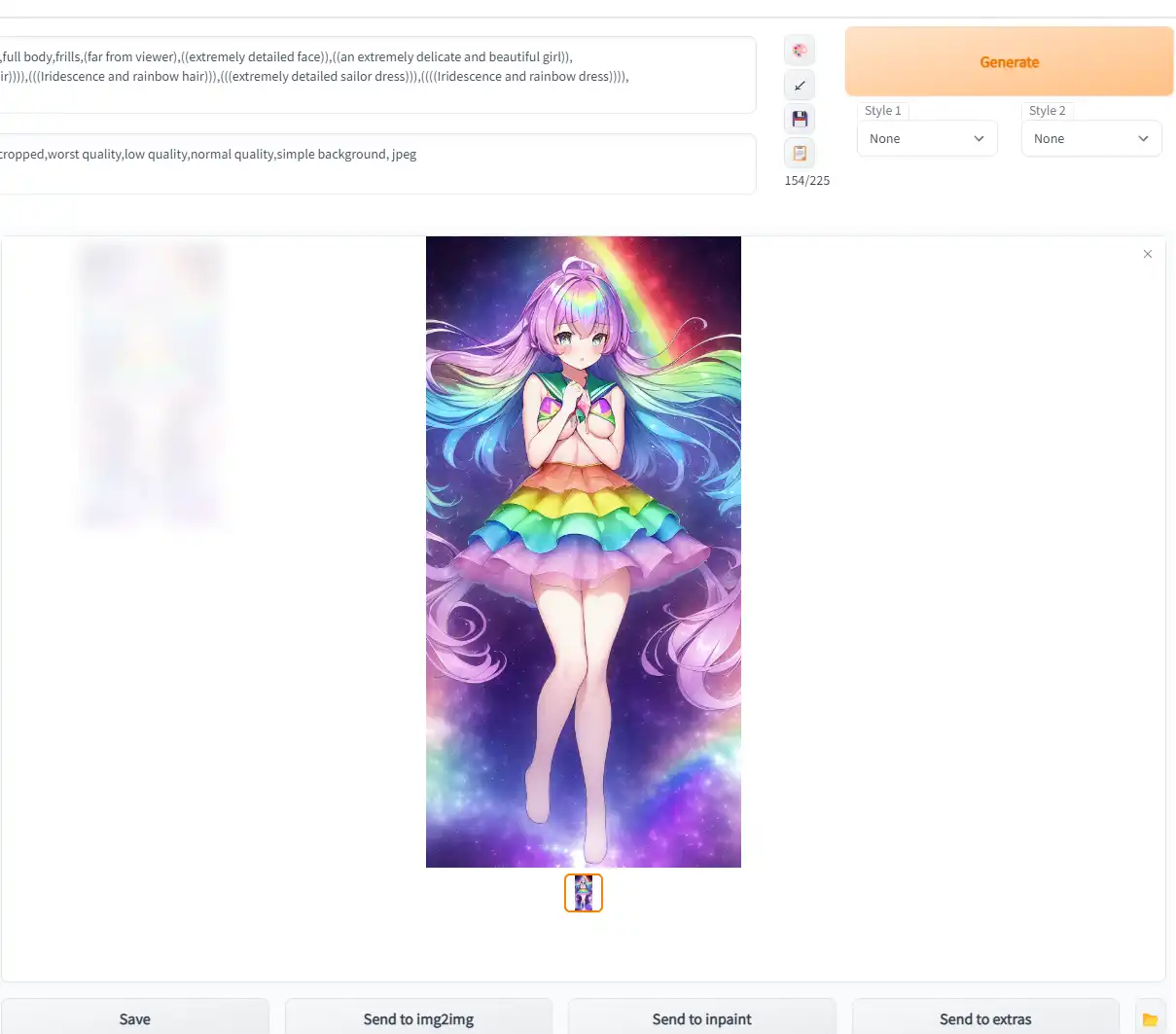

輸入文字關鍵詞描述,AI 直接生成圖像作品:

輸入真實場景圖片,圖片二次元化:
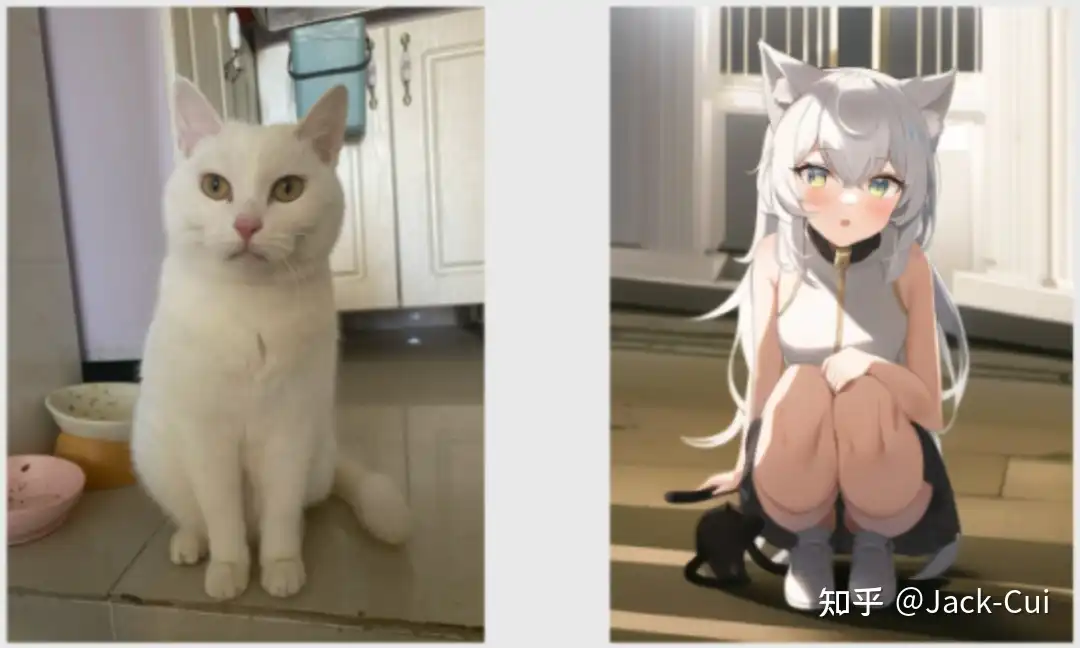
甚至可以把自己二次元化:

這種算法,不是檢索,檢索網絡上已有的作品,而完全地重新創作。

開始

首先請確定你有基本的理解能力和動手能力,基本的網絡搜索檢索信息的能力。過於基礎的東西比如“什麼是命令行”,“如何下載文件”,“magnet是什麼東西”,“滿屏英語看不懂”,“怎麼給Python,Git加上魔法上網”等等這些過於基礎的問題,我這裏無法做出説明,也不會解答。

要順利運行 stable-diffusion-webui與模型,
需要足夠大的顯存,最低配置4GB顯存,基本配置6GB顯存,推薦配置12GB顯存。
當然內存也不能太小,最好大於16GB。

顯存大小決定了你能生成的圖片尺寸,一般而言圖片尺寸越大,AI能發揮的地方越多,畫面裏填充的細節就越多。
GPU主頻和顯存位寬,則決定了你能生成的多快。
當顯存不足時,只能用時間換性能,將生成時間延長4倍,甚至8~10倍來生成同樣的圖片。

教程部署環境為
CPU:Intel® Core™ i7-10750H
GPU:NVIDIA Quadro T2000 with Max-Q Design (顯存4GB)
內存:16GB * 4
磁盤:1TB * 2 SSD
OS:win11 21H1

準備運行環境

需要準備3個或4個東西
Python 3.10.6,Git ,CUDA,這三個的下載地址在文章的最前邊。
視情況,你可能還需要一個魔法上網工具(假設你的魔法上網工具代理在127.0.0.1:6808)

安裝 Python 3.10.6 與 pip

我這裏採用直接系統內安裝Python 3.10.6的方式
如果你會用Miniconda,也可以用Miniconda實現Python多版本切換,具體我這裏不教需要的自己琢磨。

訪問 Python3.10.6 下載頁面
把頁面拉到底,找到【Windows installer (64-bit)】點擊下載

安裝是注意,到這一步,需要如下圖這樣勾選 Add Python to PATH
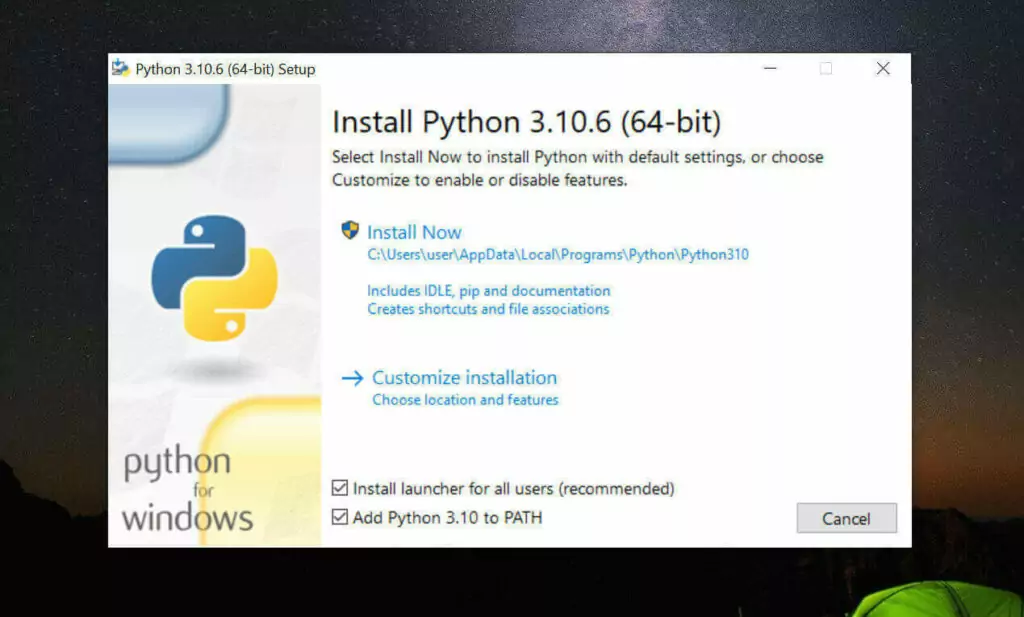

然後再點上邊的 Install Now
python

安裝完成後,命令行裏輸入Python -V,如果返回Python 3.10.6那就是成功安裝了。

命令行裏輸入 python -m pip install --upgrade pip安裝升級pip到最新版。

安裝 Git

訪問 Git 下載頁面

點擊【Download for Windows】,【64-bit Git for Windows Setup】點擊下載

一路下一步安裝

命令行運行git --version,返回git version 2.XX.0.windows.1就是安裝成功了。

安裝 CUDA

命令行運行nvidia-smi,看下自己顯卡支持的 CUDA版本
(升級顯卡驅動有可能會讓你支持更高版本的 CUDA)
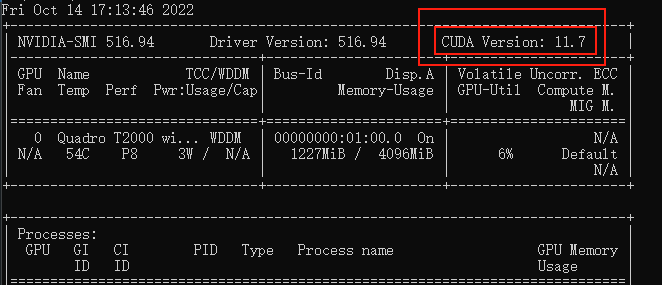

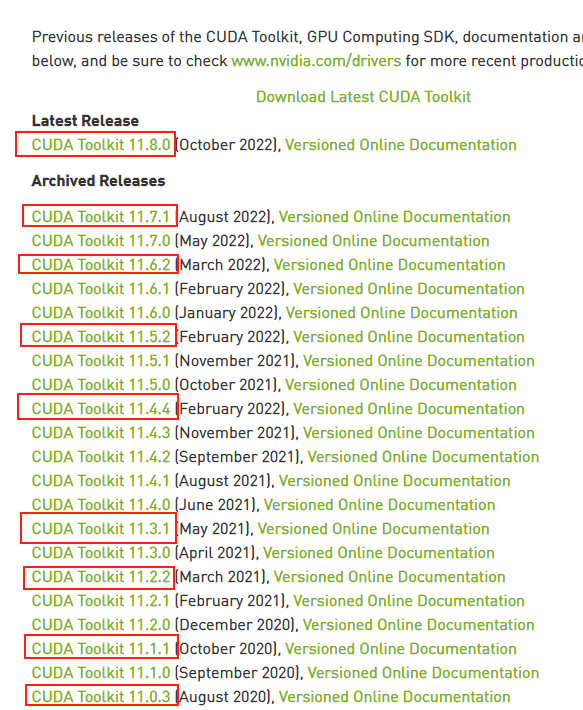
接下來前往英偉達 CUDA 官網,下載對應版本。
注意請下載,你對應的版本號最高的版本,比如我的是11.7的,那就下11.7.1(這裏最後的.1意思是,11.7版本的1號升級版)
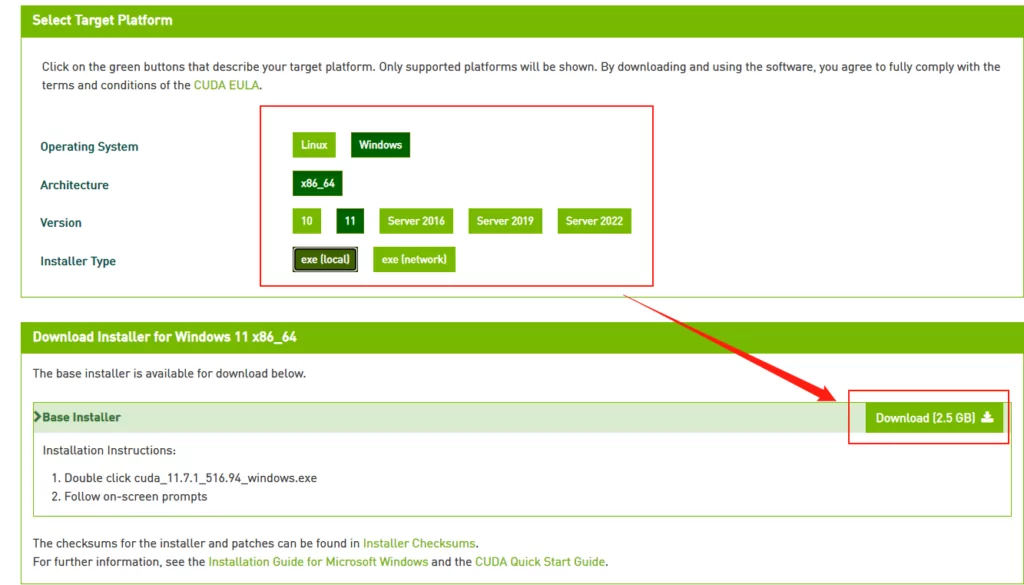
選你自己的操作系統版本,注意下個離線安裝包【exe [local]】,在線安裝的話,速度還是比較堪憂的。
下載stable-diffusion-webui

找一個你喜歡的目錄,在資源管理器,地址欄裏敲CMD,敲回車,啓動命令提示行窗口,輸入以下命令

# 下載項目源代碼
git clone https://github.com/AUTOMATIC1111/stable-diffusion-webui.git
# 切換到項目根目錄
cd stable-diffusion-webui

他會在你選擇的目錄下生成stable-diffusion-webui文件夾,放項目
這東西本體+虛擬環境+集中模型+增強腳本最後會很大的,目前我已經佔用了快20GB了,請放到磁盤空間富裕的盤符
整個路徑中,不要有中文(比如“C:\AI作畫工具\”),也不要有空格(比如“C:\Program Files”)可以避免很多奇怪的問題。

下載模型文件

stable-diffusion-webui只是個工具,他需要後端的訓練模型來讓AI參考建模。
目前比較主流的模型有

stable-diffusion:偏真人(一般簡稱為 SD 模型, SDwebui 模型)
waifu-diffusion:偏向二次元(一般簡稱 Waifu 模型,WD模型)
Novel-AI-Leaks:更加偏向二次元(一般簡稱 Naifu 模型)
模型文件一般都比較大,請找個空間富裕的磁盤下載。

模型的大致區別

名稱 需求 效果 備註
stable-diffusion (4GB emaonly模型) 2GB 顯存起步 出圖速度 10s,單次最大出 920×920 適合出圖用
stable-diffusion (7GB full ema模型) 4GB 顯存起步 帶最後一次訓練的權重,所以費顯存 適合訓練用
waifu (Float 16 EMA 模型) 2GB顯存起步 與stable性能接近 ,顯存佔用略高 適合出圖用
waifu (Float 32 EMA 模型) 2GB顯存起步 與stable性能接近,顯存佔用略高 適合出圖用,出圖質量其實和16差別不大
waifu (Float 32 Full 模型) 4GB顯存起步 與stable性能接近,顯存佔用略高 適合出圖或訓練用
waifu (Float 32 Full + Optimizer 模型) 8GB顯存起步 與stable性能接近,顯存佔用略高 適合訓練用
Naifu (4GB pruned 模型) 最低8GB顯存&8GB顯存 和官方比較接近 適合出圖用
Naifu (7GB latest模型) 最低8GB顯存(向上浮動10GB) 和官方比較接近 適合出圖或訓練用

注意這裏顯存指的是512X512尺寸,默認配置下,出圖時軟件所需要佔用的顯存。2GB顯存起步,意味浙你電腦顯卡實際顯存最少也要3GB(因為系統桌面,瀏覽器的顯示也需要佔用一部分顯存)
通過增加各種“優化”參數,可以通過性能的部分下降換取顯存佔用減少。
Nafu模型名稱説明1:animefull-final-pruned = full-latest = NAI 全量模型(包含NSFW)
Nafu模型名稱説明2:animesfw-latest = NAI 基線模型

下載stable-diffusion

下載的方式有 3 個

官網下載:https://huggingface.co/CompVis/stable-diffusion-v-1-4-original
File storage:https://drive.yerf.org/wl/?id=EBfTrmcCCUAGaQBXVIj5lJmEhjoP1tgl

磁力鏈接 magnet:?xt=urn:btih:3a4a612d75ed088ea542acac52f9f45987488d1c&dn=sd-v1-4.ckpt&tr=udp%3a%2f%2ftracker.openbittorrent.com%3a6969%2fannounce&tr=udp%3a%2f%2ftracker.opentrackr.org%3a1337

將解壓出.ckpt文件放在\stable-diffusion-webui\models\Stable-diffusion\ 下
文件名可以是任何你喜歡的英文名。比如stable-diffusion .ckpt

下載 waifu-diffusion

官網下載:https://huggingface.co/hakurei/waifu-diffusion-v1-3/tree/main

下那個 wd-v1-3-float16.ckpt 就行

將解壓出.ckpt文件放在\stable-diffusion-webui\models\Stable-diffusion\ 下
文件名可以是任何你喜歡的英文名.比如waifu-diffusion-16.ckpt

下載 NovelAILeaks(推薦)

Naifu Leaks 4chan:https://pub-2fdef7a2969f43289c42ac5ae3412fd4.r2.dev/naifu.tar

Naifu Leaks animefull-latest:https://pub-2fdef7a2969f43289c42ac5ae3412fd4.r2.dev/animefull-latest.tar

找到naifu\models\animefull-final-pruned\model.ckpt放在\stable-diffusion-webui\models\Stable-diffusion\ 下文件名可以是任何你喜歡的英文名,比如Naifu-Leaks- 4chan.ckpt

找到naifu\models\animefull-final-pruned\config.yaml放在\stable-diffusion-webui\models\Stable-diffusion\ 下文件名改成上邊和你上邊的文件同名,比如Naifu-Leaks- 4chan.yaml

找到naifu\modules\,把裏面所有的.pt文件複製到\stable-diffusion-webui\models\hypernetworks\文件夾下,沒有這個文件夾就自己新建一個。

運行

雙擊運行\stable-diffusion-webui\webui-user.bat

耐心等待,腳本會自己檢查依賴,會下載大約幾個G的東西,解壓安裝到文件夾內(視網速不同,可能需要20分鐘~2小時不等)無論看起來是不是半天沒變化,感覺像卡住了,或者你發現電腦也沒下載東西,窗口也沒變化。千萬不要關閉這個黑乎乎的CMD窗口,只要窗口最下方沒顯示類似“按任意鍵關閉窗口”的話,那腳本就是依然在正常運行的。

當你看到下圖這行字的時候,就是安裝成功了
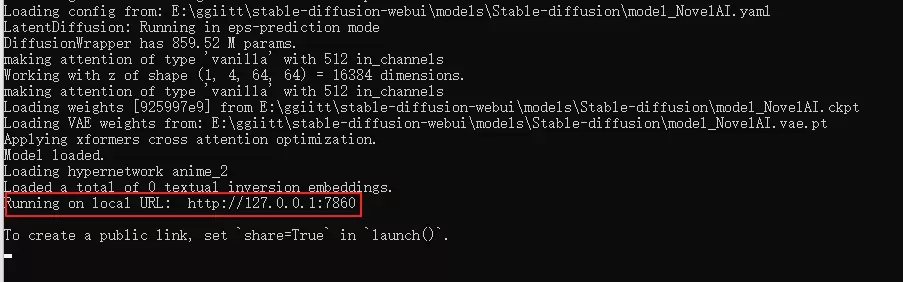
複製到瀏覽器訪問即可(默認是 http://127.0.0.1:7860 )(注意不要關閉這個窗口,關閉就退出了)

生成第一張AI作圖
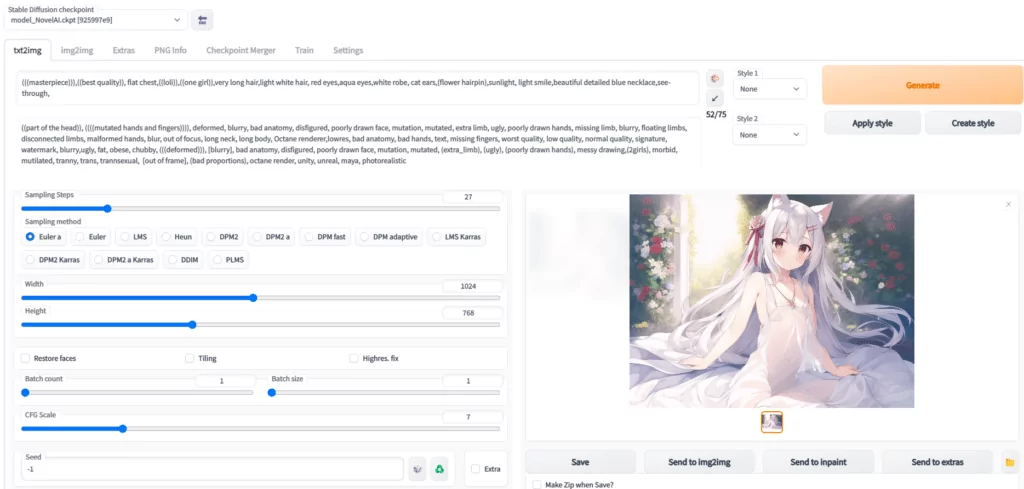

Prompt 裏填寫想要的特徵點
(((masterpiece))),((best quality)), flat chest,((loli)),((one girl)),very long light white hair, beautiful detailed red eyes,aqua eyes,white robe, cat ears,(flower hairpin),sunlight, light smile,blue necklace,see-through,
以上大概意思就是
傑作,最佳品質,貧乳,蘿莉,1個女孩,很長的頭髮,淡白色頭髮,紅色眼睛,淺綠色眼睛,白色長裙,貓耳,髮夾,陽光下,淡淡的微笑,藍色項鍊,透明

Negative prompt 裏填不想要的特徵點
((part of the head)), ((((mutated hands and fingers)))), deformed, blurry, bad anatomy, disfigured, poorly drawn face, mutation, mutated, extra limb, ugly, poorly drawn hands, missing limb, blurry, floating limbs, disconnected limbs, malformed hands, blur, out of focus, long neck, long body, Octane renderer,lowres, bad anatomy, bad hands, text, missing fingers, worst quality, low quality, normal quality, signature, watermark, blurry,ugly, fat, obese, chubby, (((deformed))), [blurry], bad anatomy, disfigured, poorly drawn face, mutation, mutated, (extra_limb), (ugly), (poorly drawn hands), messy drawing,(2girls), morbid, mutilated, tranny, trans, trannsexual, [out of frame], (bad proportions), octane render, unity, unreal, maya, photorealistic
大概意思就是排除一些負面標籤,比如奇怪的手,奇怪的肢體,減少生成奇怪圖片的幾率
Sampling Steps 你可以理解讓AI推演多少步,一般來説超過17基本就能看了,步數越多,畫面中的細節就越多,但需要的時間也就越久,一般20~30是一個比較穩妥的設定。這個數不會改變畫面內容,只會讓內容更加精細,比如20的項鍊就是一個心形鑽石,而50的項鍊還是同樣的心形鑽石,只是鑽石上會有更加複雜的線條

Sampling method 你可以理解成AI推演的算法,一般Euler a,Euler ,DDIM,都是不錯的,任選一個就行。

圖片分辨率 這個就是拼顯卡顯存的,自己調吧,低於512X512可能畫面就不會有太多細節了,越大的分辨率AI能發揮的地方就越多。

如果想放大圖片,可以去這個網站,可以實現AI放大功能
https://replicate.com/nightmareai/real-esrgan

下邊是3個擴展選項,一般不需要勾選。
Restore faces:勾選後可以生成更真實的臉,第一次勾選使用時,需要先下載幾個G的運行庫。
Tiling:讓圖片可以平鋪(類似瓷磚,生成的圖案左右上下都可以無縫銜接上自己)
Highres. fix:超分辨率,讓AI用更高的分辨率填充內容,但生成的最終尺寸還是你上邊設定的尺寸。

生成幾次,每次多少張
Batch count:是一次運行幾次
Batch size: 是同時生成多少張

比如:Batch count設置為4,用時N分鐘*4,生成4張圖;Batch count設置為4,用時N分鐘,生成4張圖,但是同時需要的顯存也是4倍。512X512大概需要3.75GB顯存,4倍就是15GB顯存了。

CFG Scale AI有多參考你的Prompt與Negative prompt
開得越高,AI越嚴格按照你的設定走,但也會有越少的創意
開的越低,AI就越放飛自我,隨心所欲的畫。
一般7左右就行。
Seed 隨機數種子,AI作畫從原理上其實就是用一個隨機的噪聲圖,反推回圖像。但因為計算機裏也沒有真隨機嘛,所以實際上,AI作畫的起始噪聲,是可以量化為一個種子數的。

Generate 開始幹活按鈕,這個就不用説了吧,點了AI就開始幹活了。

Stable Diffusion checkpoint 在最左上角,是選擇模型的,前邊讓你下載了三個,請根據自己需求和體驗自行選擇使用。

後話

使用NovelAILeaks模型,有一個額外的設置,請在頁面中選擇【settings選項卡】,把頁面往下拉到底,找到Stop At last layers of CLIP model,把他設置為2

AI作圖不是釋放魔法,不是魔咒越長施法前搖越長的魔咒威力就越大。請簡潔、準確、詳細的描述你需要的Prompt即可。像我上邊的要求就是,1個蘿莉,穿白色連衣裙,瞳孔紅色,長髮,白色,帶髮卡,貓耳,微笑,陽光下。半透明材質衣服,已經WebUI是有75個詞限制的。

如果你想生成更大尺寸的圖,但是顯卡顯存不足

用文本編輯器打開\stable-diffusion-webui\webui-user.bat。
在COMMANDLINE_ARGS=後添加–medvram
如果還不行,改成–medvram –xformers
如果還不行,改成–medvram –opt-split-attention –xformers
如果還不行,改成–lowvram
如果還不行,改成–lowvram –xformers
如果還不行,改成–lowvram –opt-split-attention
注意這是個用生成時間換圖片尺寸的事情,最極端的參數可能導致你圖片生成時間是之前的好幾倍。
最極端參數是個什麼概念呢,比如默認配置512X512一張圖是10秒內,但顯存需要4G,改成最極端配置,顯存僅需0.5~0.7G(和Sampling method有關),但代價是時長變成3分鐘。

16XX系顯卡,需要用文本編輯器打開\stable-diffusion-webui\webui-user.bat。
在COMMANDLINE_ARGS=後添加–precision full –no-half
類似下邊這樣,不然生成圖會是黑塊或者綠塊,這是個16XX系顯卡的bug

@echo off

set PYTHON=
set GIT=
set VENV_DIR=
set COMMANDLINE_ARGS=---precision full --no-half

call webui.bat

示意圖中tag如下,理論上只要參數完全一致,就可以復現出一樣的畫(僅些微細節不同)

Stable Diffusion checkpoint:NovelAILeaks 4chan[925997e9]
prompt:
(((masterpiece))),((best quality)), flat chest,((loli)),((one girl)),very long hair,light white hair, red eyes,aqua eyes,white robe, cat ears,(flower hairpin),sunlight, light smile,beautiful detailed blue necklace,see-through,
Negative prompt: ((part of the head)), ((((mutated hands and fingers)))), deformed, blurry, bad anatomy, disfigured, poorly drawn face, mutation, mutated, extra limb, ugly, poorly drawn hands, missing limb, blurry, floating limbs, disconnected limbs, malformed hands, blur, out of focus, long neck, long body, Octane renderer,lowres, bad anatomy, bad hands, text, missing fingers, worst quality, low quality, normal quality, signature, watermark, blurry,ugly, fat, obese, chubby, (((deformed))), [blurry], bad anatomy, disfigured, poorly drawn face, mutation, mutated, (extra_limb), (ugly), (poorly drawn hands), messy drawing,(2girls), morbid, mutilated, tranny, trans, trannsexual, [out of frame], (bad proportions), octane render, unity, unreal, maya, photorealistic
Steps: 27, S
ampler: Euler a, 
CFG scale: 7, 
Seed: 2413789891, 
Size: 1024x768, 
Model hash: 925997e9, 
Clip skip: 2
5/5 - (3 票)
發表我的評論
取消評論

表情 貼圖 加粗 刪除線 居中 斜體

Hi,您需要填寫暱稱和郵箱!

  • 暱稱 (必填)
  • 郵箱 (必填)
  • 網址
(3)條熱門評論及其回覆
  1. 一運行代碼就顯示讓我按任意鍵繼續咋整
    feng9223 🇨🇳Windows 11Microsoft Edge Chromium2022-11-13 16:46 檢舉回覆
  2. 求助,在文中《運行》這個環節報錯了,以下是報錯代碼。 venv "F:\stable-diffusion-webui\venv\Scripts\Python.exe" Python 3.10.6 (tags/v3.10.6:9c7b4bd, Aug 1 2022, 21:53:49) [MSC v.1932 64 bit (AMD64)] Commit hash: 828438b4a190759807f9054932cae3a8b880ddf1 Installing gfpgan Traceback (most recent call last): File "F:\stable-diffusion-webui\launch.py", line 250, in prepare_enviroment() File "F:\stable-diffusion-webui\launch.py", line 177, in prepare_enviroment run_pip(f"install {gfpgan_package}", "gfpgan") File "F:\stable-diffusion-webui\launch.py", line 63, in run_pip return run(f'"{python}" -m pip {args} --prefer-binary{index_url_line}', desc=f"Installing {desc}", errdesc=f"Couldn't install {desc}") File "F:\stable-diffusion-webui\launch.py", line 34, in run raise RuntimeError(message) RuntimeError: Couldn't install gfpgan. Command: "F:\stable-diffusion-webui\venv\Scripts\python.exe" -m pip install git+https://github.com/TencentARC/GFPGAN.git@8d2447a2d918f8eba5a4a01463fd48e45126a379 --prefer-binary Error code: 1 stdout: Collecting git+https://github.com/TencentARC/GFPGAN.git@8d2447a2d918f8eba5a4a01463fd48e45126a379 Cloning https://github.com/TencentARC/GFPGAN.git (to revision 8d2447a2d918f8eba5a4a01463fd48e45126a379) to c:\users\administrator\appdata\local\temp\pip-req-build-d3083ut7 stderr: Running command git clone --filter=blob:none --quiet https://github.com/TencentARC/GFPGAN.git 'C:\Users\Administrator\AppData\Local\Temp\pip-req-build-d3083ut7' fatal: unable to access 'https://github.com/TencentARC/GFPGAN.git/': OpenSSL SSL_read: Connection was reset, errno 10054 error: subprocess-exited-with-error git clone --filter=blob:none --quiet https://github.com/TencentARC/GFPGAN.git 'C:\Users\Administrator\AppData\Local\Temp\pip-req-build-d3083ut7' did not run successfully. exit code: 128 See above for output. note: This error originates from a subprocess, and is likely not a problem with pip. error: subprocess-exited-with-error git clone --filter=blob:none --quiet https://github.com/TencentARC/GFPGAN.git 'C:\Users\Administrator\AppData\Local\Temp\pip-req-build-d3083ut7' did not run successfully. exit code: 128 See above for output. note: This error originates from a subprocess, and is likely not a problem with pip. [notice] A new release of pip available: 22.2.1 -> 22.3.1 [notice] To update, run: F:\stable-diffusion-webui\venv\Scripts\python.exe -m pip install --upgrade pip
    命運石之門雲端 🇨🇳Windows 10Google Chrome 2022-11-21 12:59 檢舉回覆
    • 沐汐的夢
      看最後一句話,是需要升級,然後它彩色字體標識的是升級代碼,照着彩色代碼輸入升級,然後重新運行試試
      沐汐的夢 🇨🇳Windows 10Microsoft Edge Chromium2023-01-12 17:14 檢舉回覆
  3. intel的8086K核顯/win11系統運行成功,編輯“webui-user.bat”這個文件在“set COMMANDLINE_ARGS=”後輸入“--skip-torch-cuda-test --precision full --no-half”參考www.runoob.com/w3cnote/pip-cn-mirror.html和www.bilibili.com/read/cv20466834以及github.com/AUTOMATIC1111/stable-diffusion-webui/issues/5232
    IllIIl 🇨🇳Windows 11Microsoft Edge Chromium2023-02-14 04:20 檢舉回覆
    • 看了一些帖子後更正:是在CPU上運行成功
      IllIIl 🇨🇳Windows 11Microsoft Edge Chromium2023-02-14 09:32 檢舉回覆
    • 還有,我的操作是打開launch.py文件將“torch_command = os.environ.get('TORCH_COMMAND',”後的內容修改為“"pip install torch==1.13.1+cpu torchvision==0.14.1+cpu --extra-index-url https://download.pytorch.org/whl/cu117”,當時只是想試一下可能有效的改動,直到我看了“https://rentry.org/voldy#-tips-”這個文章的內容,之前還在想pytorch官網的cpu的那行應該如何才能在這裏使用,簡單的看這代碼我恰巧改動了有效的地方但又沒有完全意識到這點
      IllIIl 🇨🇳Windows 11Microsoft Edge Chromium2023-02-14 15:46 檢舉回覆
(18)個小夥伴在吐槽
  1. 羽入Ovo
    目前找到的最牛逼簡潔易懂的教程,比網上的好太多。
    羽入Ovo  🇮🇳Windows 11Google Chrome 2026-03-19 21:27 檢舉回覆
  2. intel的8086K核顯/win11系統運行成功,編輯“webui-user.bat”這個文件在“set COMMANDLINE_ARGS=”後輸入“--skip-torch-cuda-test --precision full --no-half”參考www.runoob.com/w3cnote/pip-cn-mirror.html和www.bilibili.com/read/cv20466834以及github.com/AUTOMATIC1111/stable-diffusion-webui/issues/5232
    IllIIl 🇨🇳Windows 11Microsoft Edge Chromium2023-02-14 04:20 檢舉回覆
    • 看了一些帖子後更正:是在CPU上運行成功
      IllIIl 🇨🇳Windows 11Microsoft Edge Chromium2023-02-14 09:32 檢舉回覆
    • 還有,我的操作是打開launch.py文件將“torch_command = os.environ.get('TORCH_COMMAND',”後的內容修改為“"pip install torch==1.13.1+cpu torchvision==0.14.1+cpu --extra-index-url https://download.pytorch.org/whl/cu117”,當時只是想試一下可能有效的改動,直到我看了“https://rentry.org/voldy#-tips-”這個文章的內容,之前還在想pytorch官網的cpu的那行應該如何才能在這裏使用,簡單的看這代碼我恰巧改動了有效的地方但又沒有完全意識到這點
      IllIIl 🇨🇳Windows 11Microsoft Edge Chromium2023-02-14 15:46 檢舉回覆
  3. 不行呢
    shifan 🇨🇳Windows 10Google Chrome 2023-02-05 15:31 檢舉回覆
  4. 求助,在文中《運行》這個環節報錯了,以下是報錯代碼。 venv "F:\stable-diffusion-webui\venv\Scripts\Python.exe" Python 3.10.6 (tags/v3.10.6:9c7b4bd, Aug 1 2022, 21:53:49) [MSC v.1932 64 bit (AMD64)] Commit hash: 828438b4a190759807f9054932cae3a8b880ddf1 Installing gfpgan Traceback (most recent call last): File "F:\stable-diffusion-webui\launch.py", line 250, in prepare_enviroment() File "F:\stable-diffusion-webui\launch.py", line 177, in prepare_enviroment run_pip(f"install {gfpgan_package}", "gfpgan") File "F:\stable-diffusion-webui\launch.py", line 63, in run_pip return run(f'"{python}" -m pip {args} --prefer-binary{index_url_line}', desc=f"Installing {desc}", errdesc=f"Couldn't install {desc}") File "F:\stable-diffusion-webui\launch.py", line 34, in run raise RuntimeError(message) RuntimeError: Couldn't install gfpgan. Command: "F:\stable-diffusion-webui\venv\Scripts\python.exe" -m pip install git+https://github.com/TencentARC/GFPGAN.git@8d2447a2d918f8eba5a4a01463fd48e45126a379 --prefer-binary Error code: 1 stdout: Collecting git+https://github.com/TencentARC/GFPGAN.git@8d2447a2d918f8eba5a4a01463fd48e45126a379 Cloning https://github.com/TencentARC/GFPGAN.git (to revision 8d2447a2d918f8eba5a4a01463fd48e45126a379) to c:\users\administrator\appdata\local\temp\pip-req-build-d3083ut7 stderr: Running command git clone --filter=blob:none --quiet https://github.com/TencentARC/GFPGAN.git 'C:\Users\Administrator\AppData\Local\Temp\pip-req-build-d3083ut7' fatal: unable to access 'https://github.com/TencentARC/GFPGAN.git/': OpenSSL SSL_read: Connection was reset, errno 10054 error: subprocess-exited-with-error git clone --filter=blob:none --quiet https://github.com/TencentARC/GFPGAN.git 'C:\Users\Administrator\AppData\Local\Temp\pip-req-build-d3083ut7' did not run successfully. exit code: 128 See above for output. note: This error originates from a subprocess, and is likely not a problem with pip. error: subprocess-exited-with-error git clone --filter=blob:none --quiet https://github.com/TencentARC/GFPGAN.git 'C:\Users\Administrator\AppData\Local\Temp\pip-req-build-d3083ut7' did not run successfully. exit code: 128 See above for output. note: This error originates from a subprocess, and is likely not a problem with pip. [notice] A new release of pip available: 22.2.1 -> 22.3.1 [notice] To update, run: F:\stable-diffusion-webui\venv\Scripts\python.exe -m pip install --upgrade pip
    命運石之門雲端 🇨🇳Windows 10Google Chrome 2022-11-21 12:59 檢舉回覆
    • 沐汐的夢
      看最後一句話,是需要升級,然後它彩色字體標識的是升級代碼,照着彩色代碼輸入升級,然後重新運行試試
      沐汐的夢 🇨🇳Windows 10Microsoft Edge Chromium2023-01-12 17:14 檢舉回覆
  5. xinyue
    好好好,跟老婆從小到結婚度假瑟瑟都不是夢
    xinyue 🇨🇳Windows 11Microsoft Edge Chromium2022-11-13 20:53 檢舉回覆
  6. 一運行代碼就顯示讓我按任意鍵繼續咋整
    feng9223 🇨🇳Windows 11Microsoft Edge Chromium2022-11-13 16:46 檢舉回覆
  7. 不行啊,那個4GB的pruned模型好像不能生成NSFW,怎麼回事啊
    hailang 🇯🇵Windows 10Google Chrome 2022-11-13 12:38 檢舉回覆
  8. venv "E:\AIPanting\stable-diffusion-webui\venv\Scripts\Python.exe" Python 3.10.6 (tags/v3.10.6:9c7b4bd, Aug 1 2022, 21:53:49) [MSC v.1932 64 bit (AMD64)] Commit hash: 526f0aa5569241aabf276a83af1a7216e825c6cc Installing requirements for Web UI Launching Web UI with arguments: Loading config from: E:\AIPanting\stable-diffusion-webui\models\Stable-diffusion\Naifu-Leaks-4chan.yaml LatentDiffusion: Running in eps-prediction mode DiffusionWrapper has 859.52 M params. Keeping EMAs of 688. making attention of type 'vanilla' with 512 in_channels Working with z of shape (1, 4, 64, 64) = 16384 dimensions. making attention of type 'vanilla' with 512 in_channels Error verifying pickled file from C:\Users\bbba/.cache\huggingface\transformers\c506559a5367a918bab46c39c79af91ab88846b49c8abd9d09e699ae067505c6.6365d436cc844f2f2b4885629b559d8ff0938ac484c01a6796538b2665de96c7: Traceback (most recent call last): File "E:\AIPanting\stable-diffusion-webui\modules\safe.py", line 83, in check_pt with zipfile.ZipFile(filename) as z: File "C:\Users\bbba\AppData\Local\Programs\Python\Python310\lib\zipfile.py", line 1267, in __init__ self._RealGetContents() File "C:\Users\bbba\AppData\Local\Programs\Python\Python310\lib\zipfile.py", line 1334, in _RealGetContents raise BadZipFile("File is not a zip file") zipfile.BadZipFile: File is not a zip file During handling of the above exception, another exception occurred: Traceback (most recent call last): File "E:\AIPanting\stable-diffusion-webui\modules\safe.py", line 131, in load_with_extra check_pt(filename, extra_handler) File "E:\AIPanting\stable-diffusion-webui\modules\safe.py", line 98, in check_pt unpickler.load() _pickle.UnpicklingError: persistent IDs in protocol 0 must be ASCII strings -----> !!!! The file is most likely corrupted !!!! <----- You can skip this check with --disable-safe-unpickle commandline argument, but that is not going to help you. Traceback (most recent call last): File "E:\AIPanting\stable-diffusion-webui\launch.py", line 252, in start() File "E:\AIPanting\stable-diffusion-webui\launch.py", line 247, in start webui.webui() File "E:\AIPanting\stable-diffusion-webui\webui.py", line 146, in webui initialize() File "E:\AIPanting\stable-diffusion-webui\webui.py", line 82, in initialize modules.sd_models.load_model() File "E:\AIPanting\stable-diffusion-webui\modules\sd_models.py", line 253, in load_model sd_model = instantiate_from_config(sd_config.model) File "E:\AIPanting\stable-diffusion-webui\repositories\stable-diffusion\ldm\util.py", line 85, in instantiate_from_config return get_obj_from_str(config["target"])(**config.get("params", dict())) File "E:\AIPanting\stable-diffusion-webui\repositories\stable-diffusion\ldm\models\diffusion\ddpm.py", line 461, in __init__ self.instantiate_cond_stage(cond_stage_config) File "E:\AIPanting\stable-diffusion-webui\repositories\stable-diffusion\ldm\models\diffusion\ddpm.py", line 519, in instantiate_cond_stage model = instantiate_from_config(config) File "E:\AIPanting\stable-diffusion-webui\repositories\stable-diffusion\ldm\util.py", line 85, in instantiate_from_config return get_obj_from_str(config["target"])(**config.get("params", dict())) File "E:\AIPanting\stable-diffusion-webui\repositories\stable-diffusion\ldm\modules\encoders\modules.py", line 142, in __init__ self.transformer = CLIPTextModel.from_pretrained(version) File "E:\AIPanting\stable-diffusion-webui\venv\lib\site-packages\transformers\modeling_utils.py", line 2006, in from_pretrained loaded_state_dict_keys = [k for k in state_dict.keys()] AttributeError: 'NoneType' object has no attribute 'keys' 請按任意鍵繼續. . .
    hailang 🇯🇵Windows 10Google Chrome 2022-11-12 15:26 檢舉回覆
  9. 響Con
    想知道特徵點代碼有哪些
    吳晟霄 🇯🇵Windows 10Microsoft Edge Chromium2022-11-12 12:58 檢舉回覆
  10. A卡落淚 哭哭哭~
    舉爪撓背 🇭🇰Windows 10Microsoft Edge Chromium2022-11-12 08:41 檢舉回覆
  11. 花天使之戀歌
    A卡能用以上內容嗎?
    花天使之戀歌 🇨🇦Windows 11Google Chrome 2022-11-12 04:36 檢舉回覆
  12. DIY老婆!開搞!
    nbjs 🇺🇸Windows 10Google Chrome 2022-11-12 02:15 檢舉回覆
  13. 感覺挺有意思,明天盤它
    zcygggt 🇨🇳Windows 10Google Chrome 2022-11-11 22:38 檢舉回覆